Couples App for iPhone: 6 Apps That Actually Use iOS Well
The best couples app for iPhone options in 2026, ranked by how well they use widgets, notifications, and iOS features.

Elena Voss
Relationship Writer

Choosing a couples app for iPhone is not just about picking the one with the best reviews. It is about finding an app that actually takes advantage of what your iPhone can do. Widgets on your home screen. Smart notifications that land at the right time. StandBy mode support when your phone is charging on your nightstand. These are features most Android apps cannot match, and most couples apps do not bother to implement.
I spent the last month testing every major couples app available on iOS 18.4, specifically evaluating how well each one integrates with iPhone-only features. The results were surprising. Some of the most popular names in the category barely scratch the surface of what iOS offers, while a few smaller apps use the platform beautifully.
Here is what I found.
The best couples app for iPhone in 2026 is FeelClose. It has five home screen widgets (a visit countdown, your partner's local time, days together, a couple photo and a shared memory), and they show up in StandBy mode too. Other strong options include Paired for therapy-backed content and Lovewick for the largest question library, though neither uses iOS-specific features.
Why iPhone matters for a couples app
Most "best couples app" articles treat iOS and Android as interchangeable. They are not. Apple's WidgetKit framework gives developers tools to put live, updating content directly on your home screen and lock screen. StandBy mode, introduced in iOS 17, turns a charging iPhone into a bedside display showing widgets at a glance. Focus modes let you customize which notifications reach you during date night versus work hours.
These are not minor conveniences. For a couples app, they change the daily experience completely.
A visit countdown widget sitting on your home screen means you see how many days until you are together again every time you unlock your phone. Your partner's local time on your home screen means you never accidentally call during their 3 AM. A daily question notification that respects your Focus schedule means it arrives when you actually have a moment to think about your answer, not during a meeting.
The gap between a couples app that uses these features and one that ignores them is enormous. It is the difference between an app you open intentionally once a day and an app that weaves your partner into your phone's ambient experience.
The best couples apps for iPhone, ranked by iOS integration
Not all iPhone apps are created equal. Some are cross-platform apps with an iOS wrapper. Others are built with Apple's frameworks at their core. This table shows the difference.
| Feature | FeelClose | Paired | Lovewick | Between | Cupla | Couple Joy |
|---|---|---|---|---|---|---|
| Home screen widgets | 5 types | No | No | No | Calendar widget | Basic counter |
| StandBy mode support | Yes | No | No | No | No | No |
| Haptic feedback | Yes | No | No | No | No | Yes |
| iCloud sync | Device sync | No | No | No | No | No |
| Siri Shortcuts support | No | No | No | No | No | No |
| iMessage stickers | No | No | No | No | No | No |
| Async design | Yes | Yes | No | No | Partial | No |
| Daily questions | 1/day, free | 1 free/day | Large library | No | No | Limited free |
| Built-in games | 9 games (4 free) | No | No | No | No | Quiz only |
| Free tier | Core features | Limited | Generous | Free (ads) | Free | Limited |
The pattern is clear. Most couples apps treat the iPhone as a notification delivery device and nothing more. The apps that use WidgetKit, StandBy, and Focus modes create a fundamentally different relationship with your phone.
Worth noting: no couples app currently supports Siri Shortcuts or iMessage stickers. This is a missed opportunity across the entire category. Imagine saying "Hey Siri, send my partner a nudge" or dropping a custom sticker into an iMessage thread. The first app to implement these will have a genuine iOS integration advantage that goes beyond widgets.
FeelClose: the most iPhone-native couples app
FeelClose was built for iOS from day one, and it shows. Five distinct widgets (visit countdown, partner timezone, days together counter, couple photo, and a memory your partner sends you) give you more home screen options than any other couples app on the market. Each one uses WidgetKit natively and stays current through the day without draining battery.
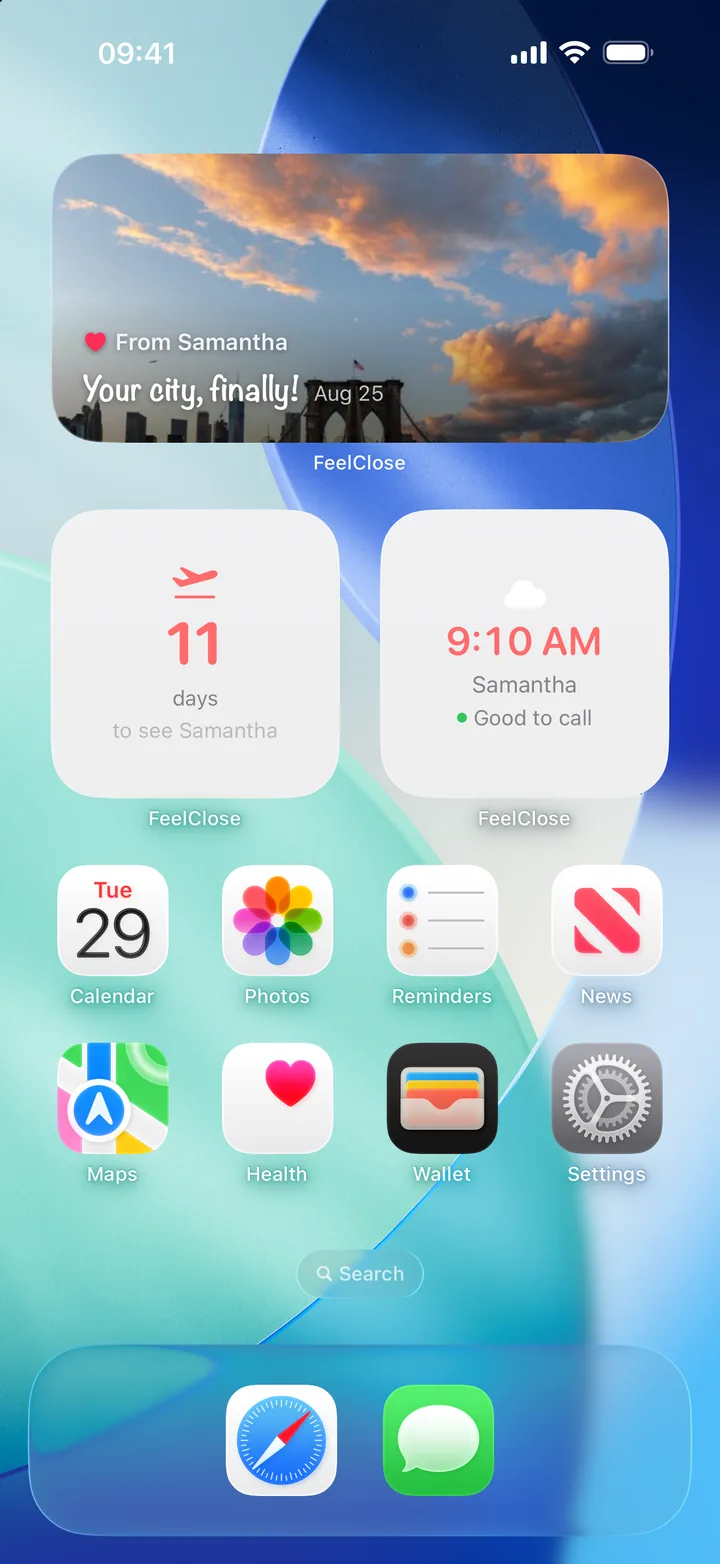
The partner timezone widget is the feature I did not know I needed. It shows your partner's current local time, their city, and even weather conditions, refreshing every minute. For couples navigating time zone differences, this eliminates the mental math that leads to poorly timed calls and missed connections. Our guide to long distance relationship communication covers why timezone awareness matters so much for LDR couples.
The visit countdown widget is simple but psychologically powerful. Research on anticipatory joy from the University of Surrey found that the anticipation of a positive event can boost happiness more than the event itself. Having that countdown visible every time you check your phone turns a passive wait into an active source of excitement.
FeelClose also supports StandBy mode. When your iPhone is charging on its side, your countdown or partner's time zone shows up as a glanceable bedside display. It is a small touch, but waking up and seeing "12 days until Tokyo" on your nightstand hits differently than opening an app to check.
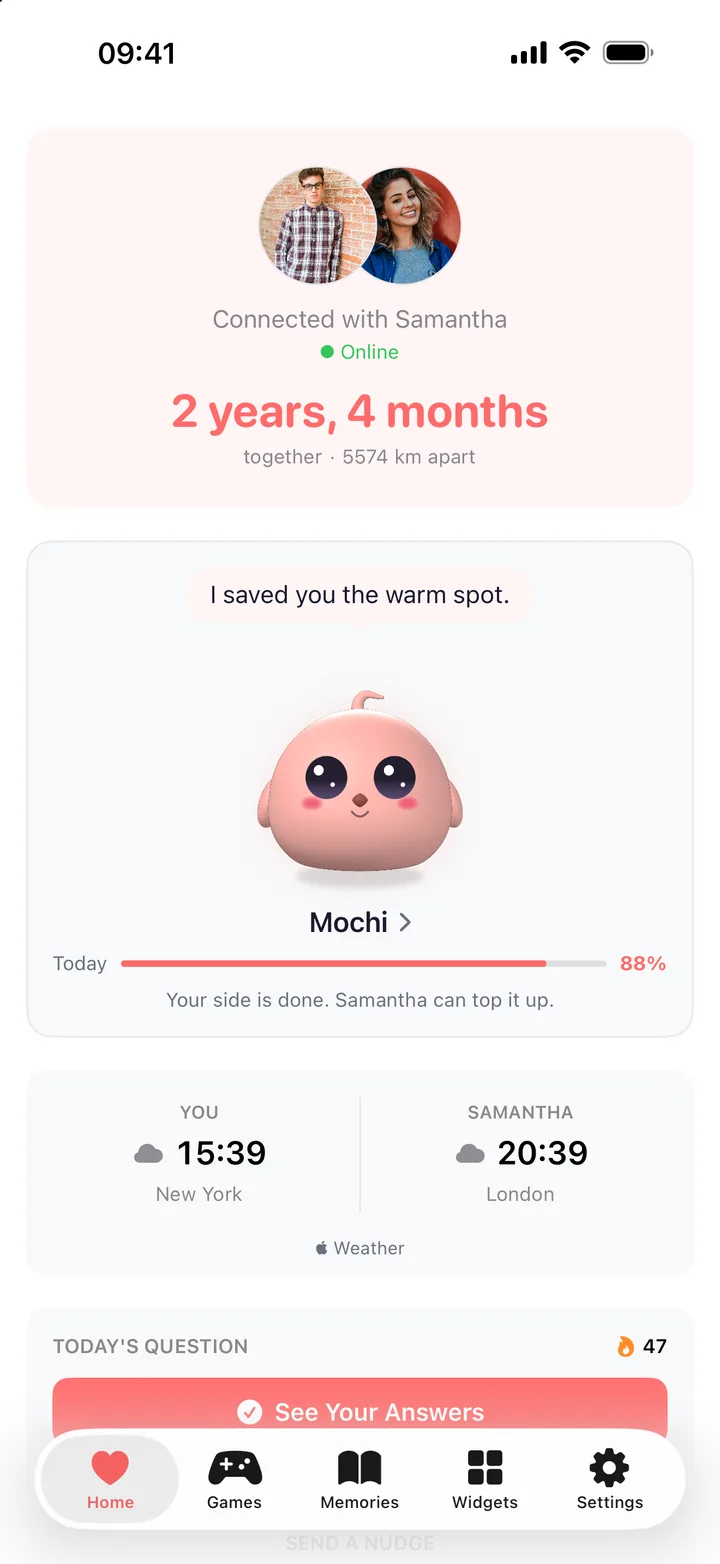
Beyond widgets, the core features cover daily relationship questions across categories (lighthearted, deep, spicy), four built-in games, nudge reminders, and fully async design so both partners can engage on their own schedule. The free tier includes everything. Premium adds extra question categories.
Platform: iOS only. Android in development.
Best for: Long distance couples who want their iPhone to feel like a connection to their partner, not just a device that occasionally delivers a notification.
Paired: strong content, weak iOS integration
Paired has become one of the most downloaded couples apps globally, surpassing 8 million downloads. The content is genuinely excellent. Daily questions designed by relationship therapists, structured courses on attachment styles and communication patterns, and expert-led video sessions make it the most educational option available.
But Paired does almost nothing with iPhone-specific features. No widgets, no StandBy support, no lock screen presence. Open the app, answer your question, close the app. That is the entire iOS experience. During testing, Paired's daily question notification arrived at a fixed time regardless of Focus mode settings. You cannot schedule it around your day. It either interrupts your morning meeting or you miss it entirely. For a premium app charging roughly $70/year, the lack of platform integration feels like a missed opportunity.
The content itself remains the strongest in the category. The attachment style quiz during onboarding is genuinely insightful, and the weekly relationship check-in format is structured well enough that couples therapists recommend it. If Paired ever ships WidgetKit support, it would immediately become the strongest all-around option. Until then, you are paying premium prices for a basic iOS experience.
Best for: Couples who want therapy-informed daily exercises and do not care about widgets or home screen integration. If you want structured relationship growth, Paired delivers. If you want your iPhone to feel connected to your partner throughout the day, it will not.
Lovewick: big question library, basic iPhone use
Lovewick claims the largest question library of any couples app, and based on testing, that claim holds up. The variety is impressive, covering everything from silly icebreakers to serious relationship conversations. The free tier is generous.
iOS integration is minimal. No widgets, no StandBy, basic notification support. Like Paired, this is a cross-platform app that happens to run on iPhone rather than an app designed around iPhone capabilities. One specific annoyance: Lovewick's question shuffle sometimes repeats questions within the same week. With a library that large, repeats should not happen for months. The app also lacks any offline caching, so questions fail to load without connectivity, which is frustrating on flights or in subway tunnels.
Best for: Same-city couples who want a massive pool of conversation starters. Not designed for long distance. For date ideas that work across distance, see our long distance date ideas guide.
Cupla: best calendar widget for couples
Cupla solves one problem exceptionally well: getting two schedules into one view. It syncs with Apple Calendar and Google Calendar, shows both partners' availability side by side, and handles timezone conversion automatically.
Its calendar widget is the one iOS integration it nails. Having your shared schedule on your home screen is genuinely useful for couples coordinating across time zones or busy work schedules. In testing, Cupla's widget updated reliably within 15 minutes of calendar changes, which is the fastest refresh you can get under Apple's WidgetKit constraints. But Cupla offers nothing for emotional connection, conversation, or play. It is a logistics tool, not a relationship tool.
Best for: Pairing with a connection-focused app like FeelClose. Use FeelClose for daily questions and games, Cupla for scheduling. Together they cover both the emotional and logistical sides of a relationship.
Between and Couple Joy: basic options
Between is a private messenger and photo album for two. No widgets, no iOS-specific features, but a clean interface for couples who want a dedicated communication space separate from iMessage. Between does support link previews when you share its content in iMessage, but that is standard iOS behavior, not a deliberate integration.
Couple Joy offers a basic days-together counter widget and mood sharing. The widget itself is static and only updates once per day, unlike FeelClose's countdown which refreshes throughout the day. The free tier is limited, pushing you toward a subscription quickly. The widget selection is thin compared to FeelClose's five options.
Neither app represents a strong case for iPhone-specific couples app design.
How to set up your iPhone as a couples app power user
This is the section no competitor article writes, and it is arguably the most useful one. Downloading a couples app is step one. Configuring your iPhone to actually support the habit is what determines whether you still use it in three weeks.
Widget placement strategy
Do not bury your couples widgets on a secondary home screen page. Place them on your main screen where you see them dozens of times per day. The psychology here is straightforward: environmental cues drive behavior more reliably than motivation. A countdown widget on your home screen is an environmental cue. An app icon buried in a folder is not.
For FeelClose, the recommended setup is your partner's timezone widget and the visit countdown side by side on your main home screen. The days-together counter and couple photo widget work well on a secondary page or in a Smart Stack.
Notification timing with Focus modes
iOS Focus modes let you schedule when couples app notifications come through. Set your couples app to deliver notifications during times when you can actually respond thoughtfully, not during meetings or workouts.
Create a "Wind Down" or evening Focus that allows your couples app through. This way, your daily question arrives when you have mental space to actually think about your answer. Rushed answers kill the habit faster than missed days do. For more on building sustainable communication habits, timing matters as much as frequency.
Here is a specific Focus mode setup that works well:
- Open Settings > Focus and create a new Focus called "Us Time"
- Under Allowed Notifications, add only your couples app
- Under Schedule, set it to activate at a time you are both typically free (8 PM works for many couples)
- Under Customize Screens, pick a Home Screen page that holds your couples widgets
This means your home screen literally switches to your partner's widgets when "Us Time" activates. Your iPhone surfaces the relationship at the moment you have set aside for it.
StandBy mode as a bedside reminder
If you charge your iPhone on a nightstand, StandBy mode transforms it into a dedicated display. Add your couples app widget to the StandBy rotation. Waking up to your visit countdown or your partner's current time creates a small daily moment of connection before you even check your messages.
Shortcuts and automation (what is possible today)
While no couples app currently registers native Siri Shortcuts actions, you can still build useful automations with the Shortcuts app:
- Open your couples app at a set time. Create an automation that opens FeelClose (or Paired, or Lovewick) at 9 PM every night. This is a blunt instrument compared to a native Shortcut, but it works as a reminder.
- Focus mode trigger. Use a Shortcuts automation to activate your "Us Time" Focus when you arrive home (based on location) or when you connect to your home Wi-Fi.
These workarounds highlight the gap. A couples app with native Shortcuts support could let you say "Hey Siri, send a nudge to [partner name]" or automate a daily question delivery based on both partners' calendar availability. That does not exist yet, but it should.
What if your partner uses Android?
This is the question every iPhone-focused couples app article avoids. The reality is that many couples are split across platforms, and cross-platform compatibility limits which apps you can use together.
Apps like Paired, Lovewick, and Between work across both iOS and Android, but you lose all iPhone-specific features in the process. Widgets, StandBy, Focus mode integration only work on the iPhone side. Your partner's experience on Android will be a basic app with notifications.
FeelClose is currently iOS-only, which means both partners need iPhones. If your partner is on Android, Paired or Lovewick are your cross-platform options for daily questions. Cupla works cross-platform for calendar syncing. For a broader look at apps that work regardless of platform, see our full comparison of apps for couples long distance.
The honest recommendation: if both of you have iPhones, use an app built for iPhone. If you are split across platforms, choose a cross-platform app and accept that you will get a more generic experience. A great couples app that both partners can actually use beats a perfect iPhone app that only one of you can install.
Frequently asked questions about couples apps for iPhone
Is there a free couples app for iPhone?
Yes. FeelClose's free tier on iOS includes the visit countdown widget, daily questions, nudges, the shared pet, and four built-in games, with no time limit. Cupla is free for shared calendar syncing. Between is free with ads for private messaging. Most other couples apps offer limited free tiers that push you toward a subscription within a few days.
Can I use a couples app if my partner has Android?
You can, but you will lose iPhone-specific features like widgets, StandBy mode, and Focus mode integration. Paired, Lovewick, and Between all work cross-platform. FeelClose is currently iOS-only, so both partners need iPhones to use it.
Do couples app widgets drain iPhone battery?
No. Apps built with Apple's WidgetKit framework update on a schedule managed by iOS itself, which is designed to minimize battery impact. FeelClose schedules its updates ahead of time (your partner's clock ticks every minute, the countdown every hour), so iOS handles them without the app running, using negligible power. You will not notice a difference in battery life.
What is the best couples app for long distance relationships on iPhone?
FeelClose is the strongest option for long distance couples on iPhone. Its visit countdown widget, partner timezone widget, and async design are built specifically for partners in different time zones. For a full comparison across platforms, see our guide to apps for couples long distance.
Can I use Siri with a couples app?
Not natively. No couples app currently registers Siri Shortcuts actions. You can use the Shortcuts app to create basic automations like opening your couples app at a set time, but voice commands like "Hey Siri, send a nudge" are not supported by any app yet.
Picking the right couples app for your iPhone
Stop downloading five apps "to compare." You will not use any of them consistently. Pick one based on your actual situation.
Both partners have iPhones and are long distance: FeelClose. Nothing else matches its iOS integration, and the async design handles time zones and mismatched schedules. Pair it with Cupla if calendar coordination is a persistent issue.
Both partners have iPhones and are in the same city: Lovewick for the question library, with FeelClose widgets for daily ambient connection.
Mixed iPhone and Android: Paired for structured content, or Lovewick for variety. You will lose widget features on the Android side.
Budget is zero: FeelClose's free tier is the most complete on iOS. Cupla is free for scheduling. Between is free with ads for private messaging. For a detailed breakdown of what each app gives you without paying, check our guide to free couples apps.
The best couples app for iPhone is the one that makes your phone feel like a bridge to your partner rather than just another screen. Widgets help. StandBy helps. Smart notifications help. But the app only works if both of you open it.
Start with one. Use it for two weeks. If your daily question becomes something you look forward to rather than something you forget, you have found the right app.
Download FeelClose free on iOS and try your first daily question tonight.
Stay Connected with FeelClose
The relationship app for long distance couples. Countdown to visits, send nudges, answer daily questions, play nine couple games, and raise a little pet together.
Download Free on iOSFeelClose for Android is coming soon
Get an email the day it’s on Google Play.